The CMS Interoperability and Patient Access Rule (CMS-9115-F) provides patients, and authorized third party apps, with access to their health information.
1upHealth provides a common RESTful API that fully supports FHIR® and provides rich, programmatic access to electronic medical record data for patients, and for the companies and institutions who serve them. The available data includes patient demographics, labs, medications, observations, procedures, allergies, and much more.
Your application must support FHIR Release 4 (R4 version 4.0.1). You must also demonstrate support for FHIR R4 and provide details about your application (logo, description, links, etc.) before it can be made available to members of the supported health plans.
For guidance on the legal requirements for app developers, see FTC guidelines.
The required client credentials (client_id and client_secret codes) are obtained by registering an account in the 1up Dev Portal.
- Register on the 1up Dev Portal, complete email verification, and login.
- Click Create a Client.
- Select an Access Type.
- Enter a Client Name.
- Enter at least one Redirect URL including the protocol (
http://orhttps://). - Click Create.
- From Sandbox Clients, copy your new client's
client_idandclient_secret.
After you have setup an application in the 1up Dev Portal, you must request that 1up sync your application to the demo environment.
Send an email to payer-patient-access@1up.health with the following information:
- Your company name.
- A short description of your application and use case.
- The
client_idfor your application.
Third-party applications must test their connection to 1upHealth's demo environment by creating an account for a test member.
The result of this process provides the code value necessary to request a Bearer token.
Navigate to the demo URL specific to your application with the format
https://auth.1uphealthdemo.com/oauth2/authorize/test?client_id={app-client-id}&redirect_uri={specified-during-app-creation}.PlaceholderReplace the
client_idandredirect_urivalues in the URL above with the values you received or specified during app creation.You are navigated to the demo health plan authentication app:
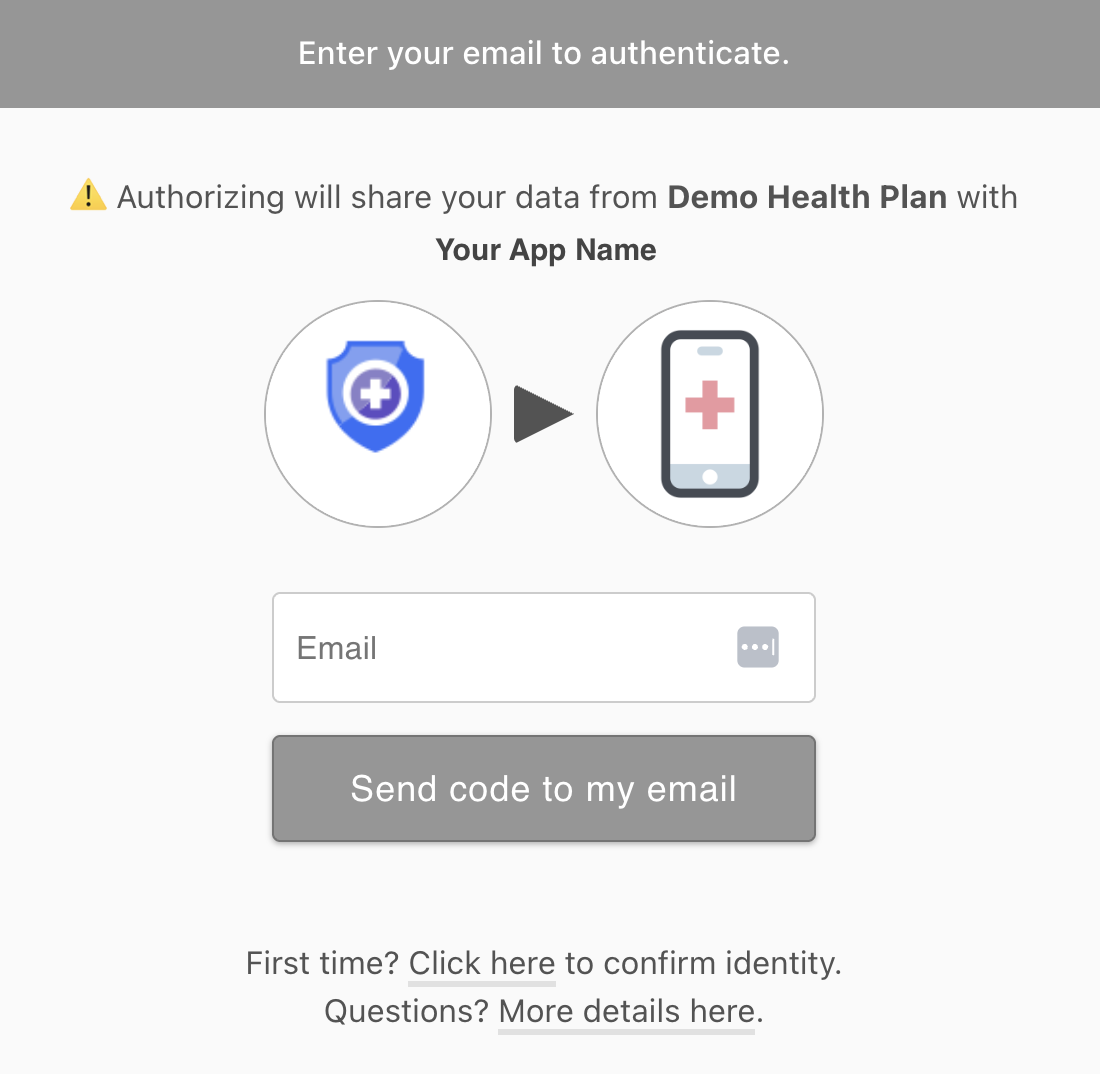
Create a new account by clicking Click here to confirm identity.
Enter the following test member information and click Verify identity:
- First Name: John
- Last Name: Allen
- Birthdate: 10/19/1940
- Plan Member ID: 123456789123
- Zip Code: 02114
If your connection is working you are navigated to
https://{redirect_uri}?code={code-value}. Theredirect_uriyou set up during app creation. Thecodeis required for the OAuth 2.0 request to get aBearertoken. Thecodeis valid for 5 minutes.
In the request below, replace the curly brackets {} and the values inside them:
curl -i -X POST \
    https://auth.1uphealthdemo.com/oauth2/token \
    -H 'Content-Type: application/x-www-form-urlencoded' \
    -d 'client_id={client_id}' \
    -d 'client_secret={client_secret}' \
    -d 'grant_type=authorization_code' \
    -d 'code={code}'
Copy the access_token from the successful response. That is your Bearer token to query FHIR resources.
You can query FHIR resources once you have a Bearer token. Supported FHIR resources may vary depending on the payer. Some payers support only resources related to claims and coverage while others also support clinical resources.
At a minimum, all payers support the following resources:
- ExplanationOfBenefit
- Coverage
- Organization
- Patient
- Practitioner
- Location
curl -i -X GET \
    https://api.1uphealthdemo.com/r4/ExplanationOfBenefit \
    -H 'Authorization: Bearer {access_token}'
curl -i -X GET \
https://api.1uphealthdemo.com/r4/Coverage \
-H 'Authorization: Bearer {access_token}'curl -i -X GET \
https://api.1uphealthdemo.com/r4/Coverage \
-H 'Authorization: Bearer {access_token}'curl -i -X GET \
https://api.1uphealthdemo.com/r4/Organization \
-H 'Authorization: Bearer {access_token}'curl -i -X GET \
https://api.1uphealthdemo.com/r4/Patient \
-H 'Authorization: Bearer {access_token}'curl -i -X GET \
https://api.1uphealthdemo.com/r4/Practitioner \
-H 'Authorization: Bearer {access_token}'curl -i -X GET \
https://api.1uphealthdemo.com/r4/Location \
-H 'Authorization: Bearer {access_token}'You must email cms-prod-access@1up.health with the following information and attachments:
- Completed Privacy & Security Attestation Questionnaire.
- Screen recording of your application connecting to the Demo Health Plan environment and displaying synthetic patient data in your application's UI.
- Your application Terms Of Service (link or attachment).
- Your application Privacy Policy (link or attachment).
- A square logo for your application (link or attachment).
- A user-facing support email address.
- A point of contact for security-related questions (not user-facing).
- A brief description of your application including the purpose, benefits, and personas your application serves (e.g. members, health plan admins).
- Are your customers direct consumers or intermediary, third-party organizations? If they're direct consumers, what is the cost of the application for consumers?
- Do you have a test instance of your application available for demonstration purposes?
- Can we share your answers to our Security and Privacy Attestation questions if a customer asks?
- Can we share your contact information with our clients? If so, which contact information is best to share?
- Do you want to integrate with a specific 1up Payer customer or all 1up Payer customers (60+ Health Plans)? If only a specific customer, which customer?
After 1upHealth's review is complete and your production access request is accepted, your API keys and redirects URIs are synced with our CMS Health Plan customer environments.
1upHealth supports the following scopes for Patient Access:
patient/*.read: Read-only permission to all of the available FHIR resources for the authenticated member.user/*.read: Read-only permission to resources for the specified user.launch/patient: Permission to request patient context when launching outside of an EHR.openid: Permission to request information about the current logged-in user.